How To Improve Your LinkedIn Profile for 2022
As the end of the year approaches, now is the ideal time to review and refresh your LinkedIn profile. Check out our guide below to learn more about how to improve your LinkedIn profile for 2022.
Table of Contents
Introduction
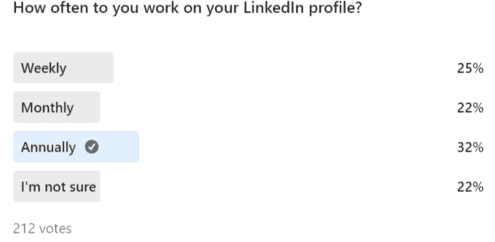
In 2021, Berkley ran a poll that revealed that 32% of job seekers update their LinkedIn profiles on an annual basis. Over the past year, LinkedIn has added many new features to their platform that you may not be aware of if you only log-in once a year. In this guide, we will walk you through these new features and their benefits. We will also share some new content types as well as three handy bonus hacks to help you improve your LinkedIn profile.
5 New & Useful LinkedIn Features to Try in 2021
1. Name Pronunciation
One way you can improve your LinkedIn profile is by recording your name pronunciation and displaying it on your page for others to hear. When you add this, a 🔊 icon will appear next to your name. Adding a recording will humanise your profile and help prevent any unfortunate mix-ups if you go for a job interview. Visit this page for a step-by-step guide on how to add a name pronunciation to your profile.

2. Personal Pronouns
Many people are adding their personal pronouns to their social bios in a show of support to the Trans community. As one source puts it, this action “tells everyone that you are not going to assume their gender.” Visit this page for a step-by-step guide on how to add personal pronouns to your profile.

3. Cover Story
A Cover Story is a short introductory video (with a max length of 30 seconds) that appears when users click on your profile picture. Profiles with a cover story will show an orange border around the profile picture.
The purpose behind these videos is to show the real human behind the profile by allowing users to provide more context about themselves, what they do and their goals.
Visit this page for a step-by-step guide on how to add a cover story to your profile. Please note that you can only record and upload a cover story using the most recent version of the LinkedIn mobile app.
4. Featured Posts
This feature allows you to display a selection of your posts on the top of your profile. This section is located toward the top of your profile between the About section and Activity section. This feature helps to boost your personal brand as it allows you to cherry-pick and showcase your best content. This could be a social media post that you are particularly proud of or an example of your work. For more advice on how to add a “Featured Posts” section, check out this guide.
5. Creator Mode
Creator Mode is designed to help content creators extend their reach on LinkedIn by giving their content more prominence on their profiles. When you activate Creator Mode you should notice the following changes:
- Under your headline, there will be a list of content topics presented in hashtag format
- There is an additional “+ Follow” call-to-action button
- The “Activity” section will feature 6 rather than 3 posts
We recommend activating “Creator Mode” if you share a lot of original content on LinkedIn or if you regularly engage in the comments section of posts. Click here for a comprehensive guide on how to turn on Creator Mode.
Spruce Up Your LinkedIn Activity with These Trending Content Types
LinkedIn Polls
The Berkley company page has been running weekly polls for several months and they have proven to be a very effective way of driving engagement and visibility. Here are our top three tips for poll success:
- Limit the response options. In our experience, simple yes/no polls do the best.
- Use hashtags to boost visibility e.g. #polltime #polloftheweek #votenow #poll
- Take inspiration from the news, holidays & recent/upcoming events
Text-Only Posts
These have become very popular recently. I suspect that these posts perform well because they break up an otherwise image-heavy feed of content. Some examples of subjects you can write about include:
- Sharing tips
- Promoting hacks
- A story about something that recently happened to you that illustrates a wider point
- Sharing something you recently learned

LinkedIn Documents
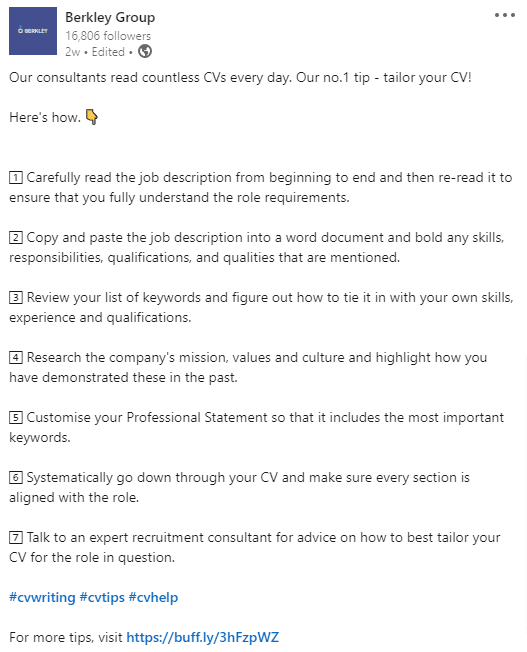
Numerous studies have revealed that “Document” content generates strong engagement in the form of click-throughs. Documents are a useful way to repurpose powerpoints or PDFs that you think may be of interest to your audience.
3 Bonus Hacks to Improve Your LinkedIn!
Spelling & Grammar
Your LinkedIn profile is public and can be seen by anyone, so it’s important to make sure that your spelling and grammar are correct. Even the best writers can make mistakes, so it’s a good idea to download a reliable spellchecker. Our favourite is the Grammarly Chrome Extension. This free tool will proof your post as you write it on LinkedIn.
Hashtags
Including hashtags will help to boost the visibility of your posts. Why is this?
- Your post will appear if someone searches for the hashtag on LinkedIn
- Your post will appear if someone follows that hashtag
We recommend adding between 3 – 5 hashtags to each post. To find relevant hashtags, start typing a hashtag into your post and LinkedIn will automatically make suggestions.
Scheduling Posts
For today’s busy professionals, finding time to post on LinkedIn can be hard. Fortunately, you can automate your LinkedIn activity by signing up to a free social media scheduling tool such as Buffer or Hootsuite. These tools allow you to write your posts in advance and schedule publication for a later date. Social media automation is hugely convenient as it allows you to write your posts at a time that suits you, rather than having to log in to each network every day.